Free Fire Font Generator: The Fastest Way to Get Your Free Fire Best Nickname 2026
The first time I saw a squad name that looked like it belonged on a neon sign, I remember thinking: how is that even the same rename screen I’ve been using for a year? Turns out it wasn’t magic, and it wasn’t a mod it was a font generator, and it took the other player about thirty seconds longer than typing “Player123.” I’ve been renaming test accounts and clan tags with these tools for the better part of a year now, and the gap between a forgettable name and a genuinely sharp nickname 2026 almost never comes down to creativity. It comes down to knowing which styles actually survive Free Fire’s rename screen.
This guide covers exactly how a font generator works under the hood, how to pick a free fire best nickname 2026 that won’t get silently trimmed or rejected, and the small mistakes I’ve personally made that wasted a rename card. If you want to skip ahead and try it yourself, ffnicknamestyle has a free generator built specifically around Free Fire’s character rules rather than generic “fancy text” conversion.
What a Font Generator Actually Does
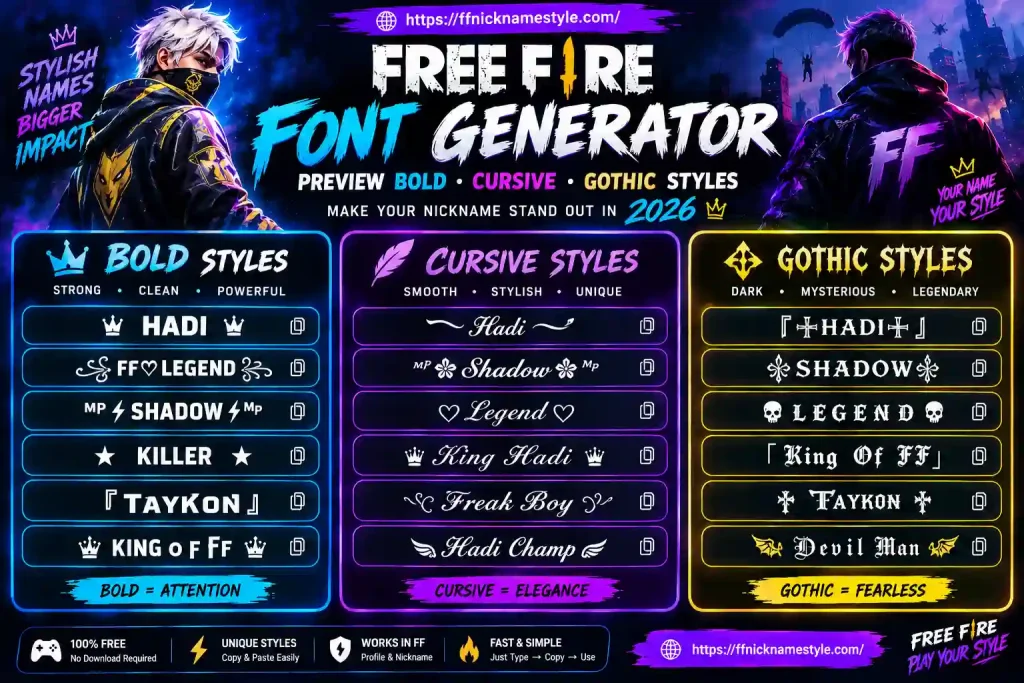
A font generator doesn’t install a new typeface on your phone, and it doesn’t touch Free Fire’s game files. It swaps every letter you type for a look-alike Unicode character the same global character standard every phone, browser, and game already reads. When you type “Alex,” the tool isn’t inventing a new “A.” It’s substituting a different, pre-existing character that already looks bold, italic, or gothic, and Free Fire renders it correctly because the character is a standard one, not a hack.
That’s the part that surprised me most when I first looked into it: the styled name you see in the kill feed, the squad list, and the end-of-match screen isn’t a special effect. It’s just a character the game was always capable of drawing. The catch is that not every Unicode symbol is supported on every device. Some render as blank boxes or question marks on older Android phones specifically. A generator worth using only offers styles it has already tested against Free Fire’s actual rendering engine otherwise you’re gambling a rename on something that might show up broken.
How to Build Your Free Fire Best Nickname 2026 in Under a Minute
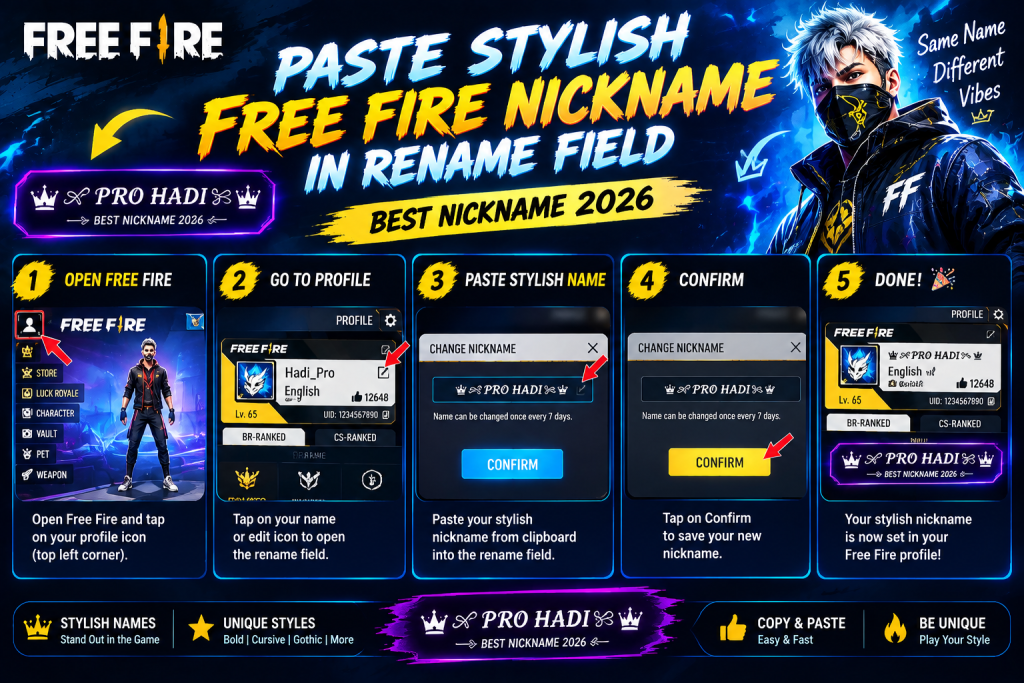
Here’s the exact workflow I use now, after wasting a rename card early on by skipping step 4:
- Open a Free Fire–specific generator, not a generic text styler. ffnicknamestyle filters out characters Free Fire is known to reject, so you’re not testing broken combinations blind.
- Type your real name idea, numbers included if you use them. The styled output keeps your original letters, so start with the version you actually want, not a placeholder.
- Compare styles side by side. Most tools generate a dozen or more variations instantly. I skip anything cluttered on a small screen legibility beats decoration every single time, especially mid-fight.
- Paste into a notes app first. This is the step I learned the hard way. It exposes invisible spacing characters before you spend diamonds on a rename that turns out blank in-game.
- Rename inside Free Fire, confirm the character count, and save. Once it’s live, your squad sees the new look in the very next lobby, and streamers watching your clips will too.
Best Styles for a Nickname 2026 That Actually Reads Well
Not every font style survives Free Fire’s UI, and after testing most of them across a few accounts, these are the ones that consistently hold up in the kill feed and squad list:
- Bold the safest pick for readability on small screens; this is what I use on my main account because it reads clearly at a glance during a hot drop.
- Italic adds motion and energy, best kept short since heavy italics blur on low-end devices.
- Cursive/script elegant on the profile screen, but test it in a custom room first since some cursive glyphs don’t render everywhere I’ve had cursive names break on a friend’s older phone even though mine displayed fine.
- Gothic sharp, aggressive letterforms that stay legible even in fast-paced fights; my personal favorite for a clan leader tag.
- Small caps a clean, organized look that reads as deliberate rather than decorative, good for squad leaders.
- Symbol-framed wrapping a name in a couple of symbols (★, ☠, ꧁꧂) adds identity without eating your whole character limit. Two symbols is the practical ceiling for me; past that it clutters the squad list and gets harder for teammates to tag you.
Free Fire Name Rules Before You Spend a Rename
Free Fire caps player names at 12 characters, and symbols, spaces, and letters all count toward that limit. Some fancy Unicode characters count as more than one character behind the scenes, so a name that looks short on screen can still get silently trimmed by the game. Impersonating a Garena employee, a pro player, or a known streamer will trigger a reset even with a stylish font layered on top the filter doesn’t care how the letters are styled, only what the name resembles. The first rename is free; every one after that costs diamonds, and the price varies by region, so it’s genuinely worth testing your nickname 2026 in a notes app before committing it in-game.
Font Generator Compatibility: Android, iOS, and PC
I’ve tested the same generator across all three platforms, and the core workflow barely changes type, pick a style, copy. Where it differs is how each device handles the copied text afterward.
On Android, copying is straightforward: long-press the styled text, tap Copy, then paste directly into Free Fire’s rename field. Older Android versions occasionally strip rarer Unicode symbols, so if a name looks broken after pasting, I switch to a simpler style from the same tool rather than assuming the tool itself is broken.
On iOS, there’s a small quirk Safari and Chrome sometimes convert fancy text back to plain text if the style uses very rare Unicode blocks. My workaround is to paste the copied name into Notes first, then copy it again from there before pasting into Free Fire. That second copy usually preserves the styling.
On PC, it’s the easiest platform to work with since you can see the full character set clearly and copy-paste with keyboard shortcuts. Free Fire on PC accepts the same Unicode characters as mobile, so there’s no compatibility disadvantage just a faster testing loop.
Fixing the Most Common Font Generator Problems
Blank or invisible-looking name: usually caused by zero-width spacing characters some generators insert to fake centered spacing. Stick to visible symbols instead of invisible ones.
Name gets rejected on save: check for banned words, an over-the-limit character count, or a Unicode block Free Fire doesn’t allow. I test the plain text first, then layer styling back on top, so I know which part is actually causing the rejection.
Font shows as boxes in-game: the device doesn’t support that specific Unicode range. Fall back to a simpler style bold and small caps are the most universally supported across devices I’ve tested.
Name is too long after styling: some decorative symbols quietly count as two or three characters each. Swap a multi-character symbol for a single glyph like ★ or ☠ to stay under the 12-character limit.
Creating a Stylish Clan Name Alongside Your Nickname
A clan name carries the same identity weight as a player name, and I use the same generator for both. The one thing that changes is priority: a clan tag needs to stay readable at a glance in the lobby and leaderboard, so I lean toward bold or small-caps styles for the tag itself and save heavier decoration for the full clan name. When every member renames using the same style pulled from a clan name generator, the whole squad looks unified in match lobbies it’s a small detail, but it’s the kind of thing that makes recruiting new members noticeably easier.
Why ffnicknamestyle Is Built for This
A lot of generators are built for general “fancy text” use and only work for Free Fire by accident, which is how people end up wasting a rename on a style that gets silently rejected. ffnicknamestyle is built around Free Fire’s actual rename rules from the start the styles offered are pre-filtered for the game’s 12-character cap and its supported Unicode ranges, so there’s less guessing involved. It also pairs directly with a dedicated clan name generator for squads renaming together.
Support for Regional Names ឈ្មោះ Free Fire 2026
Free Fire’s playerbase is global, and naming trends move differently by region. Cambodian players searching for ឈ្មោះ free fire 2026 a Free Fire name for 2026 want the same outcome English-speaking players want: a name that stands out and still clears the game’s filters, just phrased in their own language and script. A generator that only tests against Latin-script input can miss regional symbol preferences entirely, which is worth checking before you commit a rename built around a script the tool hasn’t actually verified.
Frequently Asked Questions
Is a Free Fire font generator safe to use?
Yes. A legitimate generator only converts text into standard Unicode characters it never asks for your Free Fire login or account access. I avoid any site that requests app installs or account credentials just to “generate” a name.
Why does my styled name show as boxes or question marks?
The device you’re on doesn’t support that particular Unicode range. Switch to a simpler, more widely supported style like bold or small caps and it should display correctly.
How many times can I change my name?
You get one free rename; after that, each change costs diamonds, and Free Fire limits how often you can rename within a set period so it’s worth testing your nickname 2026 before spending on it.
Do styled names work in clan tags too?
Mostly yes, though clan tags have a stricter character limit and reject more symbols than player names do. I keep clan tags under eight characters for the safest results.
Will a fancy name get my account banned?
No the text itself is standard Unicode, not a hack. What does get flagged is impersonating official accounts or streamers, or using symbols designed to look like another language’s letters.