Hangul Filler vs Space: The Complete Guide to Invisible Characters (2026)
If you’ve ever tried to create a blank username, or send a message that looks completely empty but still goes through, you’ve probably run into the confusion between a regular “space” and something called the “Hangul Filler.” On screen, both look identical nothing shows up at all. But behind the scenes, they work in completely different ways.
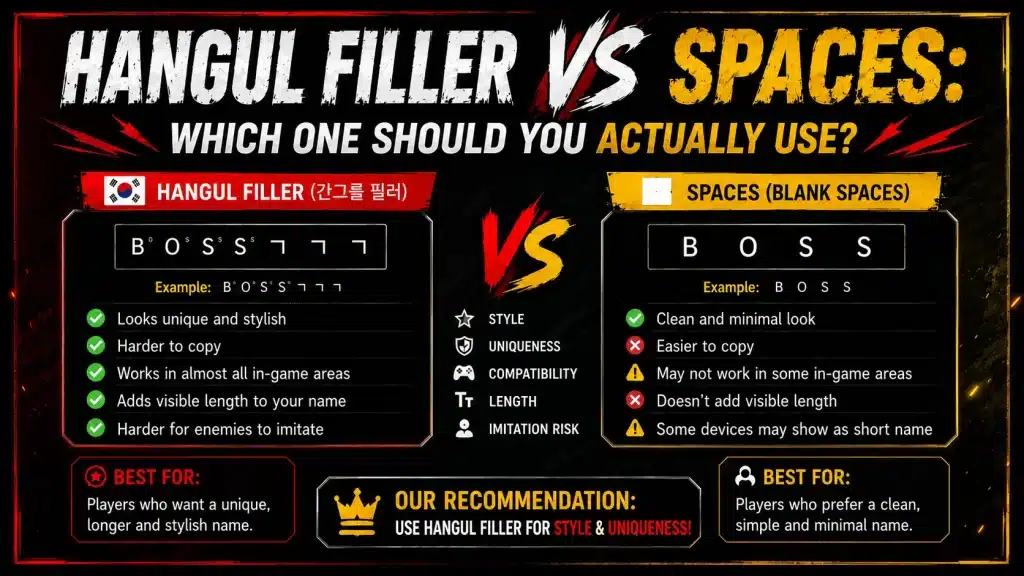
This guide breaks down what each one actually is, which platforms accept which, and when you should use one over the other.
The Real Difference Between Space and Hangul Filler
Here’s the direct answer: a regular space (U+0020) is classified as a whitespace character. Every app and website recognizes it as such. That’s why fields made up of only spaces get auto-trimmed at the start and end, and systems treat them as empty rejecting blank usernames outright.
The Hangul Filler (U+3164), on the other hand, comes from the Korean writing system. Korean syllables are built from up to three components an initial consonant, a vowel, and sometimes a final consonant. When one of those slots is empty, the filler character holds that place, similar to how a blank in a form might be filled with a placeholder dash.
Its original linguistic purpose is largely obsolete in modern Korean text processing, but the character still exists in Unicode and that’s exactly what makes the trick work.
Why Does This Trick Actually Work?
Systems that block empty fields typically check for spaces or zero-width characters. But U+3164 is classified as a letter, not whitespace. Because of that classification, it slides right past validation checks the field registers as “filled,” and the username or message saves, even though nothing appears on screen.
Comparison Table: Space vs Hangul Filler
| Feature | Regular Space (U+0020) | Hangul Filler (U+3164) |
|---|---|---|
| Character type | Whitespace | Letter |
| Trimmed from usernames? | Yes, almost always | No, treated as real text |
| Passes empty field validation? | No | Yes |
| Visible on screen? | No | No |
| Works on Discord? | Usually stripped | Usually works |
| Works in Free Fire? | Inconsistent | Highly reliable |
| Works in Word/text editors? | Yes | Yes, renders as blank space |
For most practical, real-world use cases, U+3164 wins especially when you need something invisible that won’t get deleted or rejected.
Why Is It Better for Aesthetic and Gaming Use?
This is likely why most people search for this topic in the first place: gaming profiles, Instagram bios, and messaging apps where invisible-but-clean content is the goal. Hangul filler pulls this off without getting flagged.
A few common uses that work reliably:
- Creating blank lines between sections in an Instagram bio
- Making a Discord display name appear completely empty
- Adding invisible padding around symbols in a Free Fire name
- Sending a WhatsApp message that looks blank
- Creating a “floating text” effect with strategic invisible spacing
Regular spaces usually fail at all of these because platforms already know what a space is. The Korean filler character slips through simply because most platforms have no specific rule against it.
If you’re creating a stylish gaming profile, our How to Create a Unique Free Fire Name That Stands Out guide shares practical tips for choosing an original FF nickname.
How Does This Character Behave in Text Editors?
- Microsoft Word: Renders as a small blank space, roughly the width of a Korean character. It can be selected and deleted like any other character, and spell check generally ignores it.
- VS Code / Code Editors: Appears as a very subtle blank gap. Some modern, Unicode-aware editors will flag it, but standard editors show nothing at all. Worth noting: because it’s visually undetectable, it could technically hide inside a variable name in code a minor but real quirk to be aware of.
- Plain text files / web forms: Behaves exactly like an invisible letter present in the data, invisible to the reader.
If you’re using it purely for spacing or aesthetics in documents, it works cleanly. Just remember — you can’t type it again later, you’ll need to copy-paste it each time.
When Should You Use a Regular Space Instead?
Hangul filler isn’t the right choice everywhere. In a few situations, a plain space is genuinely better:
- Professional documents, resumes, and contracts: Invisible Unicode characters can cause unexpected behavior when processed by different software. A regular space is universally understood and creates no surprises.
- HTML/Web development: For layout spacing, regular spaces combined with CSS are far more reliable. Using a Unicode filler for layout just creates unnecessary debugging headaches.
- Actual Korean-language content: If you’re genuinely writing in Korean, misusing the filler outside its intended context can break text rendering in ways that matter to readers.
Outside of those cases gaming profiles, social bios, invisible usernames, blank messages Hangul filler outperforms a regular space.
How to Type the Character
- Windows: Hold Alt, press + on the numpad, type 3164, then release Alt.
- Mac: Enable Unicode Hex Input in System Preferences, hold Option, and type 3164.
- Linux: Press Ctrl + Shift + U, type 3164, then press Enter.
- Mobile: Copy-paste is the most reliable method. Save the character in your notes app and paste it whenever you need it.
The Bottom Line
Hangul Filler vs Space isn’t really a debate once you understand what each character actually is. A regular space is whitespace platforms recognize it, trim it, and reject it constantly. Hangul filler is a letter that happens to be invisible, which is exactly why it slips past systems designed to catch spaces.
For invisible usernames, blank messages, aesthetic bios, and gaming purposes Hangul filler is the better tool. For standard documents and web development stick with regular spaces and CSS.
Knowing which tool fits which job is really the whole point.
FAQs
How do I use Hangul filler in multiple places at once?
Copy the character once and paste it wherever needed. You can also set up a text shortcut on your phone or computer so that typing a trigger word automatically expands into the character.
How do I insert U+3164 on Windows?
Hold Alt, press + on the numpad, type 3164, then release Alt. Alternatively, open Windows Character Map and search for “Hangul Filler.”
How do I type an invisible character on mobile?
Typing it directly is difficult. The most reliable method is to copy it from somewhere and save it in your notes app, then paste it whenever needed.
Does it work on every platform?
It works on most platforms Discord, Instagram, WhatsApp, and gaming platforms like Free Fire generally support it reliably. Some platforms, however, have updated their validation to catch it.