Free Fire Font Changer: The Complete Guide to Stylish Names That Actually Work
Every Free Fire lobby has that one player whose name catches your eye before the match even loads. Nine times out of ten, they didn’t design that look by hand they ran their name through a Free Fire font changer and picked a style that fit their vibe. It takes seconds, costs nothing, and it’s the fastest way to turn a plain username into something that gets noticed on the kill feed.
This guide covers everything you need to actually use a font changer well: how the tool works under the hood, which styles hold up inside the game, the mistakes that get names rejected, and how to pair fonts with symbols for a name nobody else has. Players are leaning further into bold Unicode fonts mixed with symbols this year instead of plain text. If you want to build your name from scratch instead, our name generator does the heavy lifting for you.
What a Free Fire Font Changer Actually Does
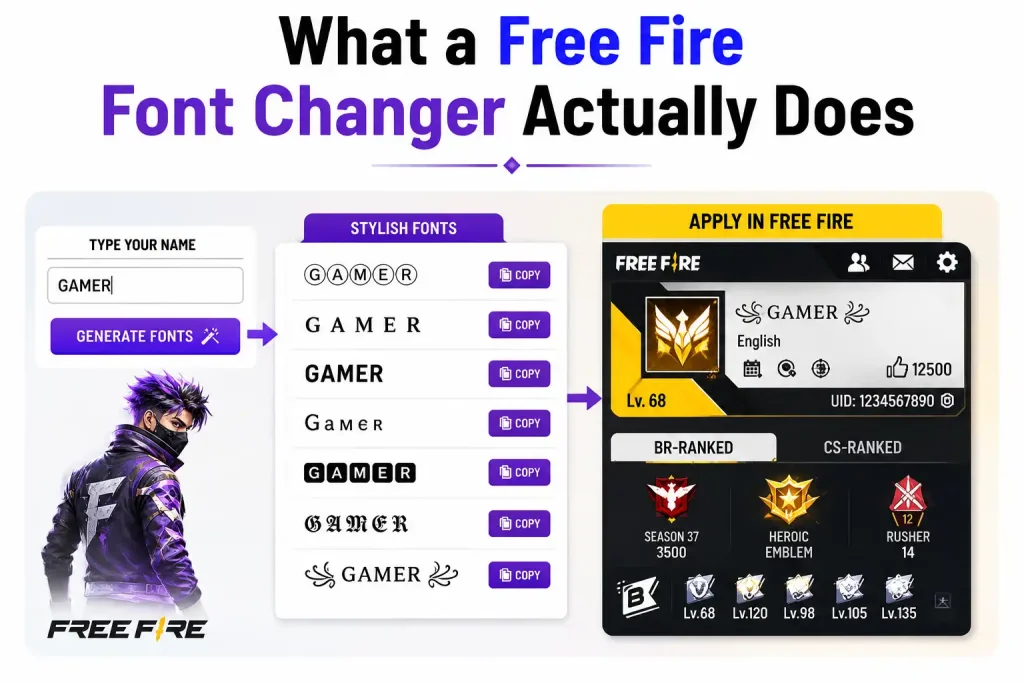
A font changer isn’t creating a new font in the design sense no font file gets installed anywhere. What it’s really doing is swapping your regular letters for Unicode look-alikes that already exist in every device’s character set. Type “Alex” into one, and it doesn’t draw a bold “Alex” it hands you a different set of characters (𝗔𝗹𝗲𝘅) that happen to resemble a bold font when they render on screen.
That distinction matters because it explains both why stylish names work in Free Fire and why some of them don’t. The game reads your name as plain text, character by character. If Free Fire’s text engine recognizes the Unicode block a character comes from, it displays fine. If it doesn’t, you get a blank box or a question mark instead which is the single most common complaint players have with fancy name tools.
Why Unicode Look-Alikes Work in Free Fire
Ek font changer koi naya font create nahi karta wo sirf aapke normal letters ko Unicode look-alike characters se replace karta hai jo pehle se har device ke character set mein maujood hote hain. Yehi wajah hai ke ye names bina kisi app install kiye kaam kar jaate hain.
Why Some Fonts Show Blank Boxes
Free Fire aapke naam ko plain text ki tarah read karta hai, character by character. Agar game ka text engine us Unicode block ko recognize nahi karta jahan se character aaya hai, to aapko blank box ya question mark dikhta hai ye sabse common complaint hai stylish name tools ke sath.
How to Convert Text to Stylish Fonts, Step by Step
- Pick a tool that previews before you commit. You want to see dozens of style options at once, not generate them one at a time. Slow tools cost you time you don’t have between matches.
- Type your base name in plain letters. Skip symbols and spacing tricks at this stage the converter handles the styling. Feeding it clean text gives you cleaner output.
- Scroll and compare styles side by side. Bold, italic, cursive, gothic, bubble, monospace you’ll usually get 30+ options in one screen. Don’t grab the first flashy one; hold a few side by side against your clan tag or profile theme.
- Paste it somewhere safe first. Drop the copied text into your phone’s notes app before touching the game. This is where you catch broken characters if it looks wrong in Notes, it’ll look wrong in Free Fire.
- Apply it in-game and confirm on a second device if you can. Open your profile, tap the name field, paste, and save. Ask a friend to screenshot how it looks on their phone rendering can differ between Android skins and iOS.
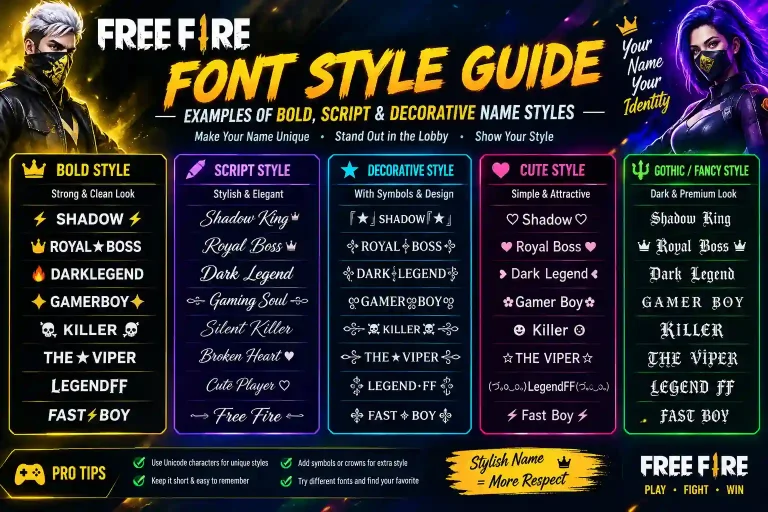
Bold, Cursive, or Gothic Which Style Actually Works Best
Not every stylish font is a good fit for a name you’ll be using in ranked matches, guild chats, and the kill feed dozens of times a day. Here’s how the main categories actually perform:
| Style | Looks like | Best for | Watch out for |
|---|---|---|---|
| Mathematical bold (𝗕𝗼𝗹𝗱) | Thick, clean letters | Main IGN, competitive play | Nothing major most reliable option |
| Monospace (𝚖𝚘𝚗𝚘) | Typewriter-style spacing | Squad names, clean look | Can feel plain without symbols |
| Double-struck (𝔻𝕠𝕦𝕓𝕝𝕖) | Outlined, hollow letters | Profile flair, bios | Slightly harder to read fast |
| Cursive / script | Flowing, handwritten | Guild tags, room titles | Poor readability at small sizes |
| Gothic / Fraktur | Old-English, sharp edges | Clan banners, intimidation names | Frequently unsupported on older phones |
| Bubble / circled | Rounded, enclosed letters | Casual play, cute themes | Eats up character count fast |
| Zalgo / glitch | Stacked, distorted marks | Status messages only | Breaks almost everywhere else |
The pattern is simple: the closer a style stays to standard letterforms, the more reliably it displays and the easier it is for your squad to call your name out mid-fight. Save the extreme styles for places where legibility doesn’t matter as much.
Best Fonts for Competitive/Ranked Play
Agar aap ranked matches ya main IGN ke liye naam bana rahe hain, to Mathematical Bold ya Monospace styles sabse reliable rehte hain ye har device par consistently render hote hain aur squad ke liye padhna aasan hota hai.
Best Fonts for Casual & Clan Names
Clan tags, room titles, ya casual profiles ke liye Cursive, Gothic, ya Bubble styles zyada personality dikhate hain lekin inhe sirf wahan use karein jahan legibility itni zaroori na ho.
Common Font Changer Mistakes That Get Names Rejected
Most naming problems trace back to a handful of repeat mistakes:
- Pulling from unsupported Unicode blocks. Some converters use obscure character sets that Garena’s servers or your device font simply can’t render, which is why blank boxes show up.
- Stacking too many decorative elements. One or two symbols plus a styled font reads as intentional. Five symbols plus zalgo marks reads as broken and eats into your 12-character limit fast, since some styled characters count as more than one slot.
- Ignoring Free Fire’s naming rules. Names that impersonate staff, use hate speech, or stack special characters to dodge filters get flagged regardless of how the font itself renders.
- Never testing before spending a rename card. Rename cards aren’t free. Paste your styled name into a notes app or chat first if it breaks there, it’ll break in-game too.
Unicode Compatibility Mistakes
Kuch converters obscure Unicode blocks use karte hain jo Garena ke servers ya aapke device ka font support nahi karta isi wajah se blank boxes aate hain.
Naming Rule Violations
Names jo staff impersonate karte hain, hate speech use karte hain, ya filters bypass karne ke liye special characters stack karte hain inhe flag kar diya jata hai, chahe font kitna bhi acha render ho.
Mobile vs Desktop: Does It Change Anything?
Since most Free Fire players are on mobile, that’s where font changers get used most copy from the browser, paste into the name field, done. iOS occasionally swaps out specific Unicode symbols that Android renders fine, so cross-testing matters more for iPhone users.
On desktop (usually through an emulator), the bigger screen makes it easier to line a styled name up against your guild tag before committing. Keeping a Unicode symbol reference open in a second tab is a common trick for building more elaborate names without leaving the browser. Either way, remember your opponents will mostly be viewing your name on a phone screen, so it’s worth double-checking mobile rendering even if you built the name on a PC.
Pairing Fonts with Symbols for a Name Nobody Else Has
A styled font alone gets you halfway there. What actually makes a name memorable is combining it with a symbol or two a crown, a star, a small decorative bracket placed at the start or end rather than scattered throughout. Match the symbol’s shape to the font’s tone: sharp, angular fonts pair naturally with geometric symbols like arrows or diamonds, while rounder, softer fonts suit hearts and stars better.
If you want ready-made symbol sets instead of hunting for individual Unicode characters, browse our symbol collection for squads building a matching set of tags.
Frequently Asked Questions
Is it safe to use a font changer for my Free Fire name?
Yes. A font changer only converts and copies text it has no access to your account, and nothing gets installed. You’re just pasting different characters into a name field the same way you’d paste any other text.
Why does my stylish name show blank squares in-game?
Your device or Free Fire’s text engine doesn’t recognize that particular Unicode block. Switch to a more common style mathematical bold or monospace styles are the safest bet and the blank boxes usually disappear.
Does a styled name take up more of my 12-character limit?
Sometimes. Certain Unicode styles count individual characters as more than one slot, which is why a name that looks short can still get cut off. If your name keeps getting truncated, try a plainer style or trim the symbol count.
Can I use a font changer entirely from my phone?
Yes nearly all font changer tools run in a mobile browser, no app or install required. Type, pick a style, copy, and paste straight into Free Fire.
How often can I actually change my in-game name?
There’s no time-based cooldown you can rename as often as you like, as long as you have a Name Change Card or 390 diamonds each time. Test as many styles as you want beforehand; the only real limit is how many cards or diamonds you’re willing to spend.
Once you’ve settled on a style you like, you can build the whole name font, symbols, and spacing in one place with our name generator.